Help › Media, protocols & experiments
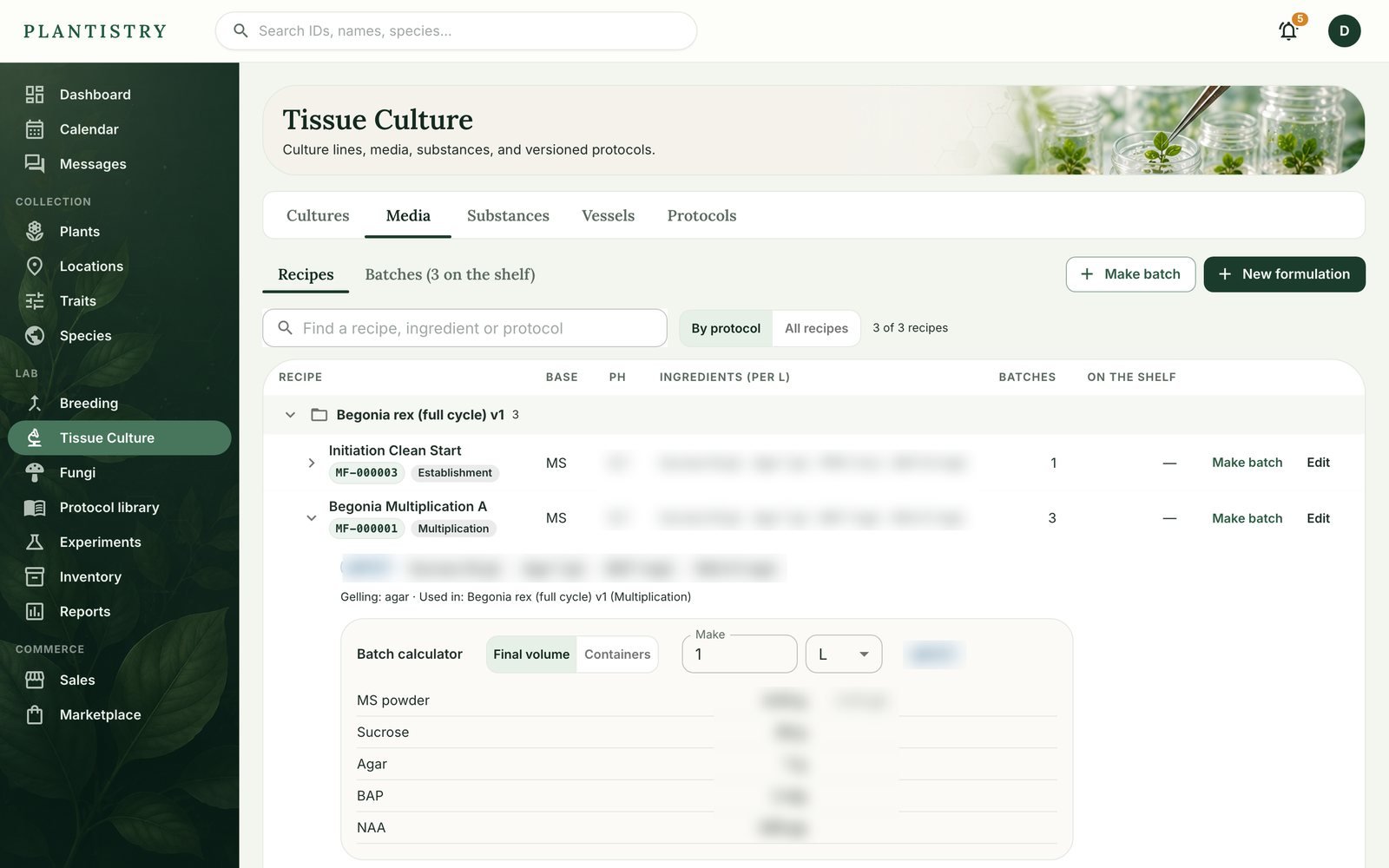
Use the batch calculator
Every recipe has a batch calculator, on the web and the phone. Tell it how much you're making and it scales the recipe for you, in amounts you can read off a balance.
Pro plan- Open a recipe: on the web under Tissue Culture → Media (or Fungi → Media), on the phone from Lab → Tissue Culture → Media.
- In the Batch calculator, choose Final volume and type how much you're making, in mL or L.
- Or choose Containers: how many you're filling and how many mL go in each.
- Read off each ingredient, already in a unit you can weigh: grams, milligrams or micrograms. Where you keep a substance as a stock solution, it also says how much stock to add instead.
- Pouring it? Make batch records the batch, with how many containers it filled.
Tip: The calculator only reads; nothing is saved until you make the batch. Try a few volumes before you start weighing.
Good to know: The web and the phone use the same calculation, so the desk and the bench give the same numbers.
Still stuck? Tell us what you were trying to do.Contact support